WordPress core
Security releases applied promptlySmall patch releases are installed within a few days of appearing. Big version jumps are held back until we know your theme and plugins cope with them.

Website Maintenance
Updates, backups, security checks and quick content changes for Kingston business websites, so the site keeps working after every plugin release and keeps telling the truth through storms, festivals and each change of season.

Kingston runs on a calendar that keeps changing what customers need to read. Patios open and close with the weather, cruises leave the downtown waterfront from mid-April to October, and students arrive in September and leave in April and May. A restaurant’s summer hours, a mover’s booking dates or a landlord’s “now renting for 2026” banner all need changing on time, and a site still showing last season’s details suggests nobody is minding the shop.
Winter brings another kind of update. Suggestions such as “kingston ontario winter storm” and “kingston west end power outage update” show people checking for closures and delays as they happen. When a storm shuts your doors or moves appointments, many customers look at your website before they phone. A prompt notice saves them a wasted trip.
Behind the pages, a WordPress site depends on parts that other people update without asking you: the platform itself, your theme, each plugin, the server’s PHP version, the security certificate. Now and then one breaks something quietly: a booking calendar that freezes on some phones or a form that thanks the visitor and then delivers nothing. Upkeep means someone checks before a customer notices.
Search demand
Google.ca suggestions from October 2026. None is about websites as such, but each shows customers checking for something that changes: hours, closures, schedules and seasons.
Each search above concerns something that changes, so we pair the technical upkeep with a notice routine: send us the closure, the new hours or the season’s dates, and the change goes live as soon as we can make it, along with a reminder to update your Google listing to match.
Hidden faults
Each of these can carry on for months while the home page looks perfectly fine.
A patio menu still up in November, a “book your September move” banner in the depths of winter, Christmas hours lingering into spring. Each one quietly suggests that nobody is paying attention, and some visitors take it as a hint that you have closed.
WordPress sends form emails in a way many mail providers distrust, so inquiries can be filtered out without a trace. We route them through an authenticated sending service and submit a test inquiry each month to confirm one actually reaches you.
When the certificate lapses, browsers show a full-page warning in place of your site, and most visitors turn back at that point. Renewal is normally automatic, right up until a hosting or domain change breaks it without anyone noticing.
Many small business sites were first set up by a friend or a former employee, and domain reminders may still go to them years later. We list every account the site relies on, who controls it and when it renews, and move stray ones to the business.
Attackers rarely deface the home page; they add junk pages deep in the site, which Google indexes and your visitors never see. The first sign is often a Search Console warning or a sudden fall in search traffic.
Layers that need care
We look after them separately, because a problem in one rarely announces itself in the others.
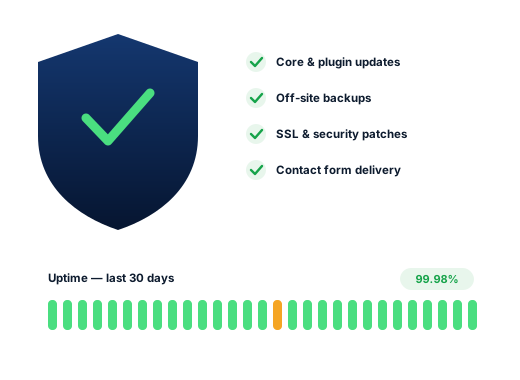
Small patch releases are installed within a few days of appearing. Big version jumps are held back until we know your theme and plugins cope with them.
Plugins come from many authors with very different habits. We keep the list short, update the survivors on a schedule, and delete anything idle, since a deactivated plugin’s files can still be reached from outside.
Hosts retire old PHP versions on their own timetable. We check compatibility in advance and schedule the switch on a quiet weekday, not in the middle of your busiest week.
These are set up once and then ignored, which is exactly why they cause outages. A lapsed domain takes your email down along with the website, so we keep the renewal dates in our calendar as well as yours.
The work
A restore point is saved before anything changes. Updates then go on in a planned order, and we click through your busiest pages, forms and booking tools to be sure they still behave.
Copies kept with a separate provider, so a hosting failure or a hijacked account cannot take the backups down with the site.
Two-step login for administrators, old staff accounts closed, file changes and malware watched, and urgent fixes applied the same week a serious plugin flaw is announced.
Uptime monitoring that pings the site around the clock and tells us when it stops answering, often before you would spot it from your own desk.
Each month we send a test message through every contact and booking form and confirm that it reaches the right inbox.
New hours, a storm closure, a festival-week special, a change of staff: send it over and it goes up, then comes down again once it no longer applies.
Done carefully
The standards we hold ourselves to on every account, set down in writing.
Our access is a separate login you can switch off in thirty seconds. Everything else, from hosting to domain, stays in your name.
Everyday maintenance comes with every monthly plan. The exception is a site that arrives years behind on updates or already compromised: bringing it to a safe starting point is a one-off job, and you get the price before we touch anything.
Ask us about your business
How we work
Four stages, in the same order for every Kingston client, whatever the trade.
We audit your site and Business Profile and check your positions from downtown, the west end and the towns you serve.
We pick the Kingston searches most likely to bring work and match each one to a single page.
Profile, website, content and listings are improved in order of likely payoff, timed around your busy season.
You receive a one-page summary of the month’s calls, enquiries and rankings, plus the jobs lined up next.
Questions
Nothing extra for the routine work: it is folded into each monthly plan, from $250 to $550 in Canadian dollars, and you can leave at the end of any month. If your site needs rescuing first, that one-off repair is priced separately once we have seen its condition.
Yes. A short email saying what is closed and until when is enough; we add a banner across the site and suggest matching special hours on your Google Business Profile so both say the same thing. Once you reopen, the banner is removed.
Yes. Routine content edits such as hours, seasonal menus, price lists and dated banners are part of upkeep.
Most of the time. Our first job is detective work: what the site is built on, which accounts it depends on and whether anything is already compromised. Once we know, you receive a written plan with any one-time costs spelled out.
Change your hosting and WordPress passwords, then contact us. The clean-up is a one-off job: we remove the malicious files and database entries, fix whatever let the attacker in, and, if Google has marked the site as unsafe, request a review once it is clear.
No, and that is on purpose. The hosting account is in your business’s name with the provider invoicing you, so keeping the site up never hinges on us.
Further reading
More on this topic for business owners in Kingston, Ontario.
Any of these can be hired on its own; many clients begin with just one.
Customers look for each of these in their own way, so every page is researched separately.
A free audit shows how you rank from downtown to the west end, who sits ahead of you and which fixes will count most.
Request my free audit